

Product schema: the complete guide for e-commerce stores
December 27, 2025 | by Gaurav Radadiya

Search for any popular product on Google.
Look at the results. Some listings show star ratings. Others display prices and “In Stock” badges. A few even show shipping information.
Now search for one of your own products.
If you’re like most e-commerce store owners, your listing looks… plain. Just a blue link and a couple lines of text.
That difference comes down to one thing: product schema.
The stores with enhanced listings have it. You probably don’t. At least not completely.
Here’s the frustrating part. You’re not doing anything wrong with your SEO. Your products aren’t worse than the competition. Google simply doesn’t have the information it needs to display your products the same way.
This guide fixes that.
By the end, you’ll understand exactly what product schema is, why Google needs it, and how to implement it on your store without touching code.
What is product schema?
When someone lands on your product page, they immediately understand what they’re looking at. A shirt. $45. Blue. In stock. 4.5 stars from 200 reviews.
Search engines aren’t that smart.
Google sees your product page as a jumble of text, images, and numbers. It can guess what your page is about, but guessing leads to mistakes.
Product schema removes the guessing.
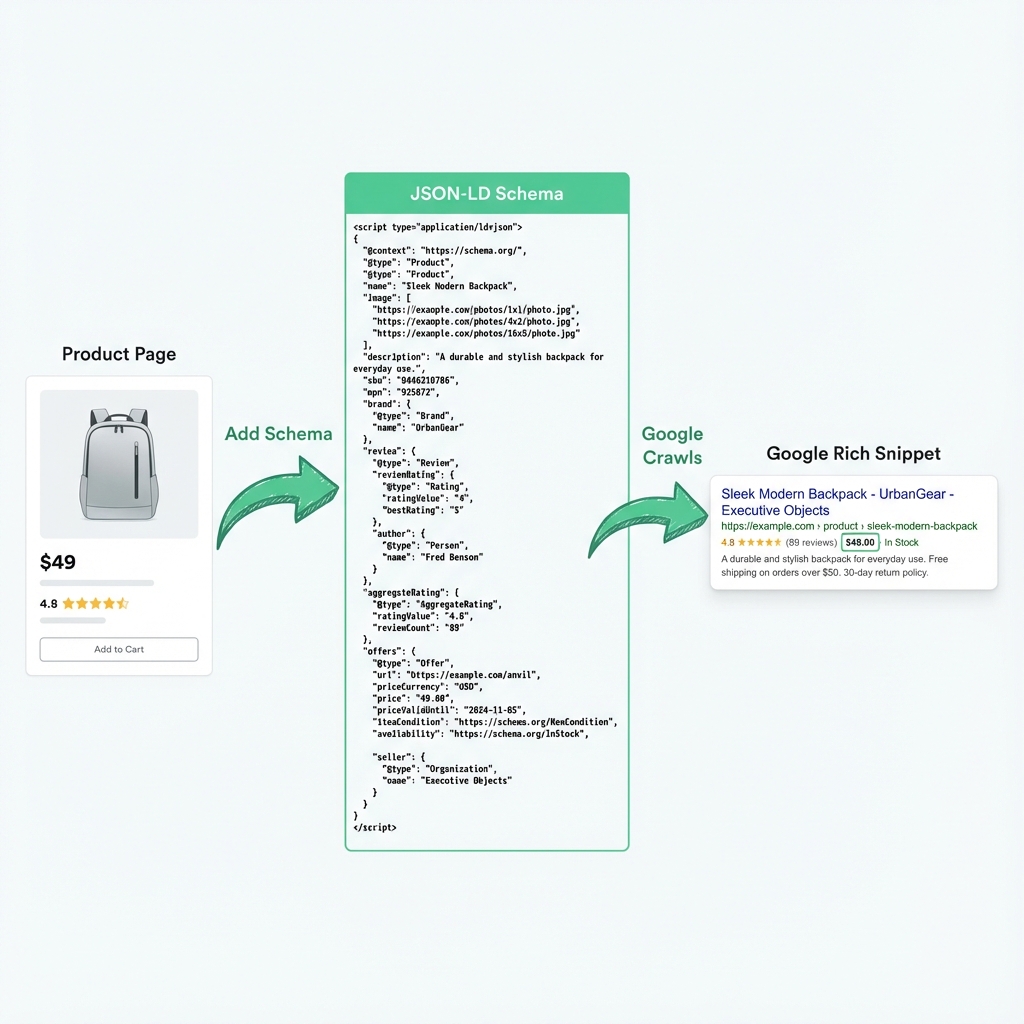
It’s structured data that explicitly labels every piece of information on your product page:
- “This text is the product name”
- “This number is the price”
- “This badge means it’s in stock”
- “These stars represent customer reviews”
Think of it as a translation layer between your website and search engines.
Google’s preferred format for this translation is JSON-LD (JavaScript Object Notation for Linked Data). It’s a snippet of code that lives in your page’s HTML but remains invisible to shoppers.
When Google crawls a page with proper product schema markup, it can confidently display that information in search results. Those enhanced listings are called rich snippets.
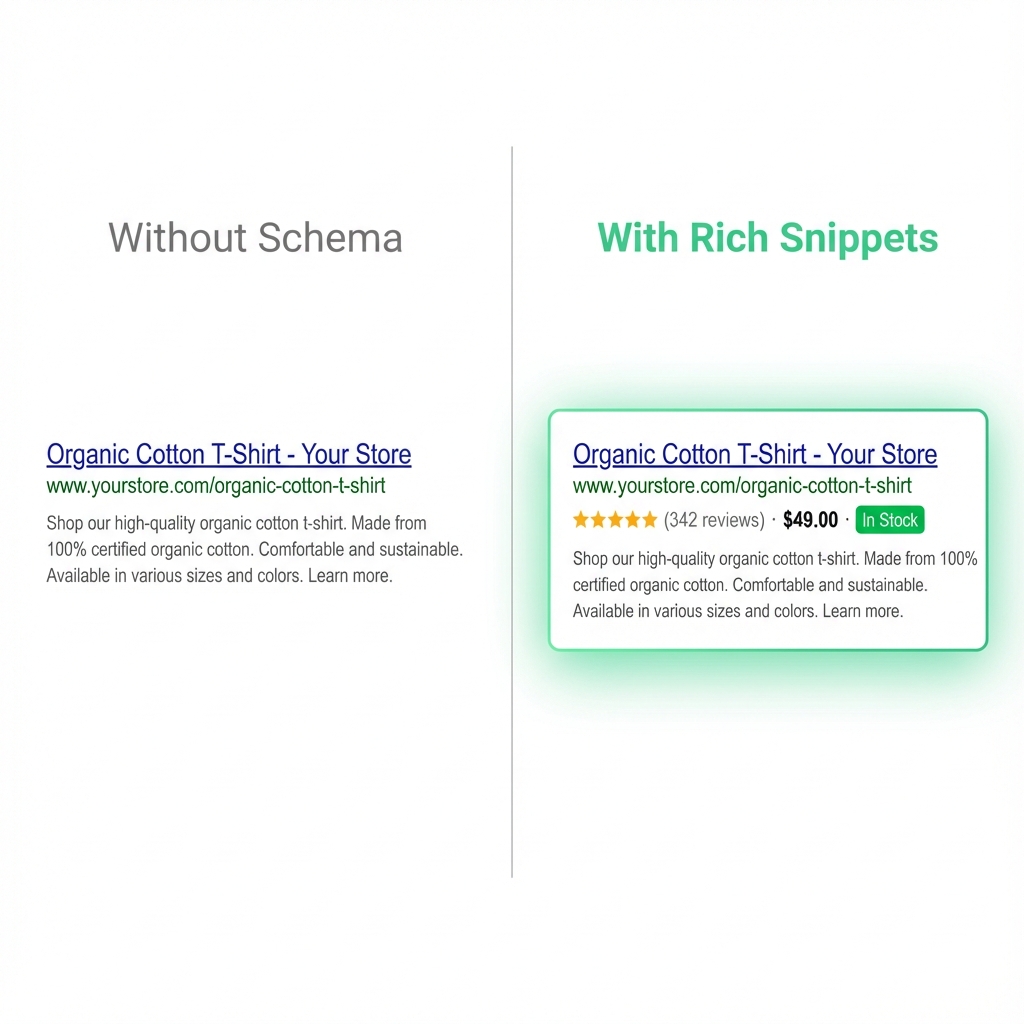
Rich snippets transform a basic search listing into something that grabs attention:
| Without Rich Snippets | With Rich Snippets |
|---|---|
| Page title | Page title |
| URL | URL |
| Meta description | Price: $45.00 |
| ★★★★★ (200 reviews) | |
| In Stock |
Same product. Same search ranking. Dramatically different visibility.
Why product schema matters for your store
Schema markup isn’t a ranking factor. Google has said this directly.
So why bother?
Because rankings aren’t everything. What happens after you rank matters more.
Click-through rates jump significantly
Google’s own research suggests structured data can improve click-through rates by up to 30%.
Think about what that means. If 1,000 people see your listing each month and 3% click through, that’s 30 visitors. Boost that click-through rate to 4% with rich snippets, and you’re getting 40 visitors from the same ranking.
Same position. 33% more traffic. No additional SEO work.
You pre-qualify shoppers before they land
When someone sees your star rating in search results, they’ve already started forming an opinion about your products.
A listing showing “★★★★★ 4.8 (342 reviews)” attracts shoppers who value social proof. They arrive on your page already trusting your products more than if they clicked a plain link.
This pre-qualification can improve conversion rates because visitors arrive with higher purchase intent.
AI search changes everything
Google’s Search Generative Experience and other AI-powered search tools rely heavily on structured data.
These systems don’t just index your pages. They try to understand your products well enough to recommend them in conversational responses.
Without product structured data, AI systems struggle to include your products in shopping-related answers. As AI search grows, proper schema becomes table stakes for e-commerce visibility.
Your competitors might not have it
Despite how important product schema is, most e-commerce stores still have incomplete implementations.
Shopify themes include basic schema. But basic isn’t enough for rich snippets. The stores showing star ratings and prices in search results have gone beyond the defaults.
This is an opportunity. Complete product schema markup can help you stand out when competitors haven’t put in the work.
How product schema appears in Google
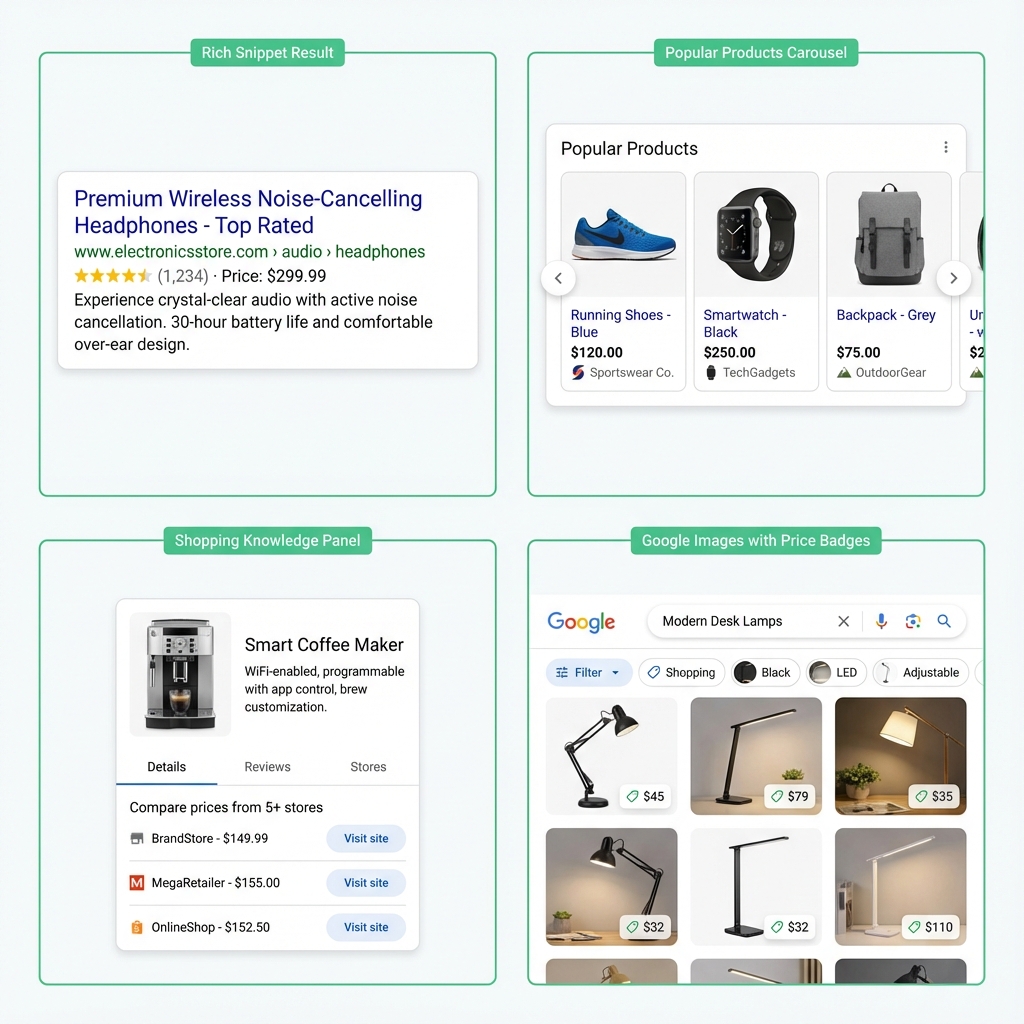
Google uses your product structured data across multiple search features. Understanding where your schema shows up helps you prioritize which properties to include.
Standard search results with rich snippets
The most common use. Your normal search listing gets enhanced with additional information pulled from your schema.
Depending on what data you provide, Google might display:
- Star ratings and review counts
- Price and currency
- Availability status
- Shipping cost highlights
- Return policy summaries
These enhancements appear directly in the standard blue link results. No special placement needed.
Popular Products carousel
For shopping-intent searches, Google sometimes displays a carousel of products above or alongside regular results.
This visual presentation highlights product images alongside key details. Products with complete schema and quality images have better chances of appearing here.
Shopping Knowledge Panel
When Google confidently identifies a specific product, it may show a knowledge panel on the right side of desktop results.
This panel aggregates information about the product from multiple sellers. Your schema helps Google understand that your product matches what the shopper is looking for.
Google Images shopping results
Product schema extends to image search. When shoppers browse Google Images for products, items with proper schema display price badges and shopping indicators.
This feature is particularly valuable for visually-driven product categories like fashion, home decor, and accessories.
Product snippets vs merchant listings: which do you need?
Google actually supports two different types of product markup. Using the wrong type can limit your eligibility for rich results.
Product snippets
This markup type is designed for pages where visitors cannot purchase directly.
It works best for:
- Editorial product reviews
- “Best of” comparison articles
- Blog posts discussing products
- Affiliate content
Product snippets support detailed review information like pros and cons. They’re optimized for informational content rather than transactional pages.
Merchant listings
This markup type is designed for pages where visitors can complete a purchase.
It works best for:
- E-commerce product pages
- Category pages with buyable items
- Any page with an “Add to Cart” button
Merchant listings support transactional details like shipping costs, return policies, size availability, and precise inventory status.
The right choice for e-commerce stores
If you’re running a Shopify store or any e-commerce platform, merchant listings is almost always the correct choice.
Your product pages exist to sell. The structured data should reflect that purchase opportunity.
The good news: there’s significant overlap between the two formats. Implementing merchant listings properly also qualifies your pages for product snippets when relevant. You get the best of both approaches.
📌 Note: For a detailed breakdown of each format’s specific properties, see our guide on product snippets vs merchant listings.
Essential product schema properties
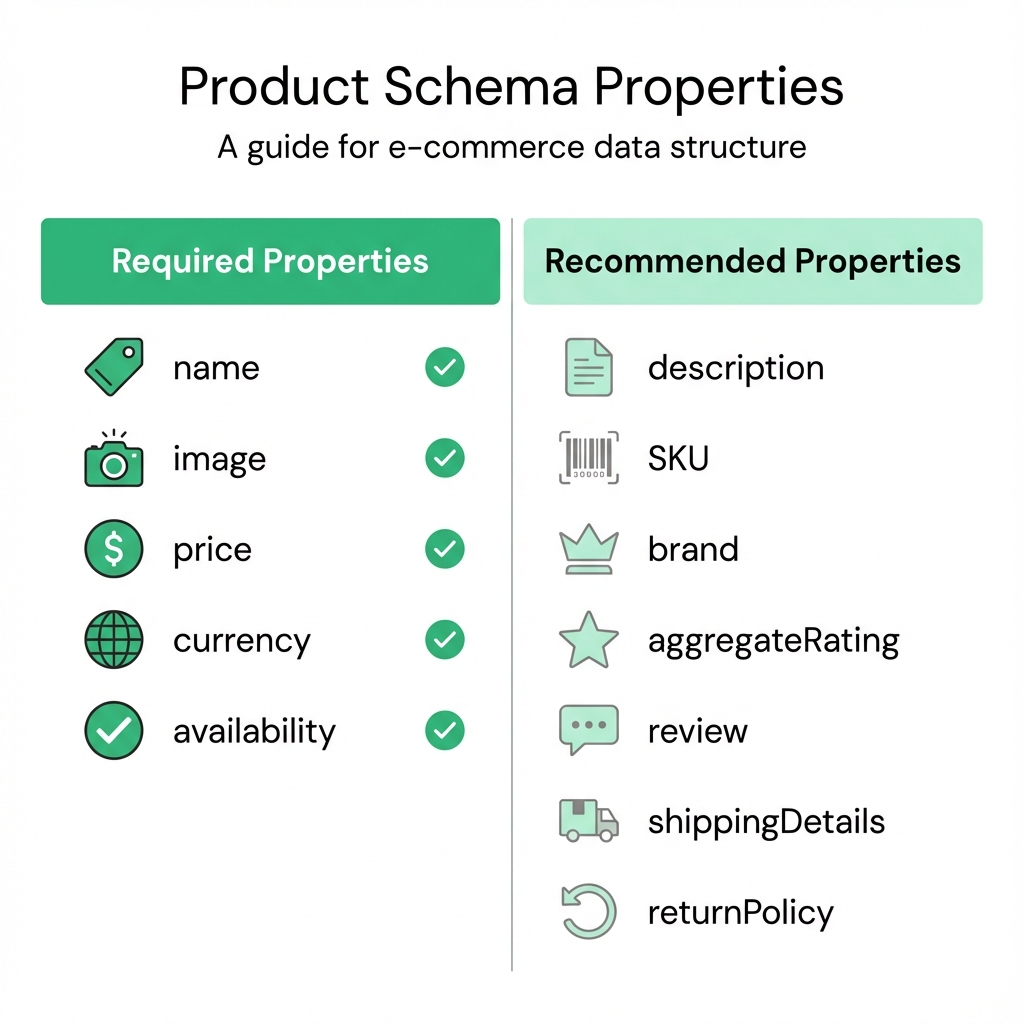
Not all schema properties are equal. Some are required for rich results. Others improve your chances. A few are nice-to-have extras.
Required properties
Google won’t consider your schema valid without these:
| Property | Description | Example |
|---|---|---|
name |
The product’s title | “Organic Cotton Crew Neck T-Shirt” |
image |
At least one product photo | Full URL to image file |
offers |
Pricing container | Contains price, currency, availability |
offers.price |
The product’s cost | “49.00” |
offers.priceCurrency |
Three-letter currency code | “USD”, “GBP”, “EUR” |
offers.availability |
Stock status | Schema.org availability URL |
Missing any of these? Your product schema won’t qualify for rich snippets.
Strongly recommended properties
These aren’t technically required, but they significantly improve your rich result eligibility:
| Property | Why It Matters |
|---|---|
description |
Helps Google understand your product’s purpose |
sku |
Unique identifier that prevents confusion between products |
brand |
Enables brand-based search features |
aggregateRating |
Powers star ratings in search results |
review |
Individual reviews add credibility signals |
Properties for competitive advantage
If you want maximum visibility, consider these additional properties:
| Property | What It Enables |
|---|---|
shippingDetails |
Shipping costs displayed in results |
hasMerchantReturnPolicy |
Return policy badges |
gtin or mpn |
Product matching across sellers |
color, size, material |
Variant-specific information |
Complete JSON-LD example
Here’s what thorough product schema markup looks like:
{
  "@context": "https://schema.org",
  "@type": "Product",
  "name": "Organic Cotton Crew Neck T-Shirt",
  "image": [
    "https://yourstore.com/images/tshirt-navy-front.jpg",
    "https://yourstore.com/images/tshirt-navy-back.jpg",
    "https://yourstore.com/images/tshirt-navy-detail.jpg"
  ],
  "description": "Premium organic cotton t-shirt with reinforced stitching. Pre-shrunk for consistent fit. Available in 8 colors.",
  "sku": "OCCT-NAVY-M",
  "brand": {
    "@type": "Brand",
    "name": "Your Brand Name"
  },
  "aggregateRating": {
    "@type": "AggregateRating",
    "ratingValue": "4.7",
    "reviewCount": "284"
  },
  "offers": {
    "@type": "Offer",
    "url": "https://yourstore.com/products/organic-cotton-tshirt",
    "price": "49.00",
    "priceCurrency": "USD",
    "availability": "https://schema.org/InStock",
    "priceValidUntil": "2025-12-31",
    "seller": {
      "@type": "Organization",
      "name": "Your Store Name"
    }
  }
}
Every property here serves a purpose. Google uses each one to build a complete understanding of your product.
Three ways to add product schema to your store
You have options for implementing product schema. Each approach has trade-offs worth understanding.
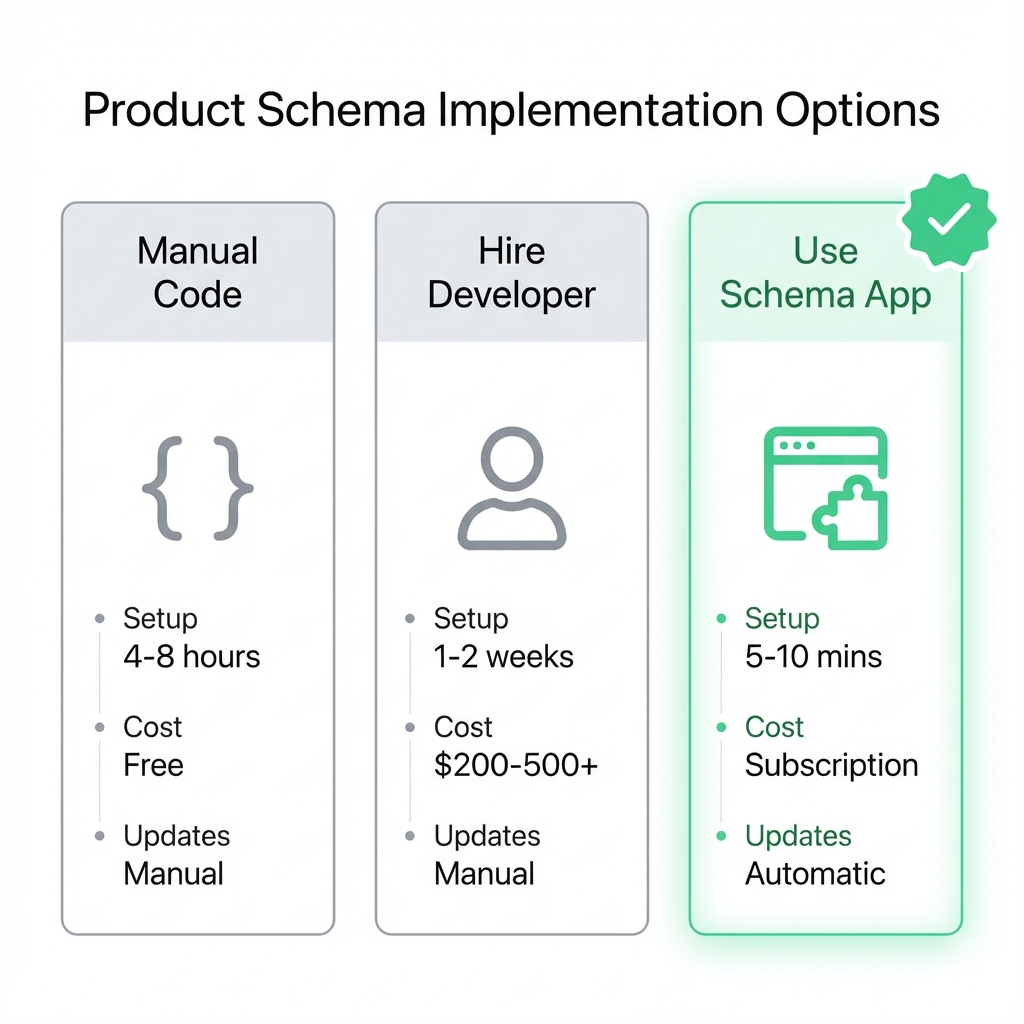
Option 1: Manual code implementation
Edit your theme’s template files directly to add JSON-LD markup.
For Shopify stores, this means modifying product.liquid or main-product.liquid files. You’d write custom Liquid code that pulls product data into the JSON-LD format.
When this makes sense:
- You have development resources available
- You need highly customized schema logic
- Budget constraints prevent other options
The challenges:
- Syntax errors break schema entirely (and are easy to make)
- Theme updates can override your changes
- Adding new products doesn’t automatically update schema
- Maintaining accuracy as products change requires ongoing work
- Debugging problems requires technical knowledge
⚠️ Warning: JSON-LD is unforgiving. A missing comma or misplaced bracket invalidates your entire schema block. Google will ignore it completely without warning you in search results.
Option 2: Hire a developer
Commission a Shopify expert to implement custom product schema for your store.
When this makes sense:
- You want professional implementation
- One-time setup is acceptable
- You have budget for development work
The challenges:
- Costs typically range from $200-500 for basic implementation
- Complex requirements increase costs significantly
- Ongoing changes require repeat engagements
- You depend on someone else’s availability and responsiveness
- Knowledge doesn’t transfer to your team
Option 3: Use a dedicated schema app
Install an app that handles product schema automatically across your store.
When this makes sense:
- You want minimal technical involvement
- Products and prices change frequently
- Time is more valuable than subscription costs
- You prefer ongoing support to one-time setup
The advantages:
- Setup takes minutes, not hours
- Schema updates automatically when products change
- No coding knowledge required
- Support team handles problems
- Stays current with Google’s requirements
Super Schema Plus follows this approach. Install the app, and it crawls your entire store automatically. Every product page gets valid JSON-LD markup that updates whenever your products change.
Comparing your options
| Factor | Manual Code | Developer | Schema App |
|---|---|---|---|
| Initial time | 4-8 hours | 1-2 weeks | 5-10 minutes |
| Technical skill needed | High | None | None |
| Automatic updates | No | No | Yes |
| Ongoing maintenance | You handle it | Pay for changes | Included |
| Upfront cost | Free | $200-500+ | Free trial |
| Monthly cost | None | None | Subscription |
| Schema stays current | Your responsibility | Your responsibility | App handles it |
Testing and validating your product schema
Implementation without validation is guesswork. Always verify your schema works before waiting for rich snippets.
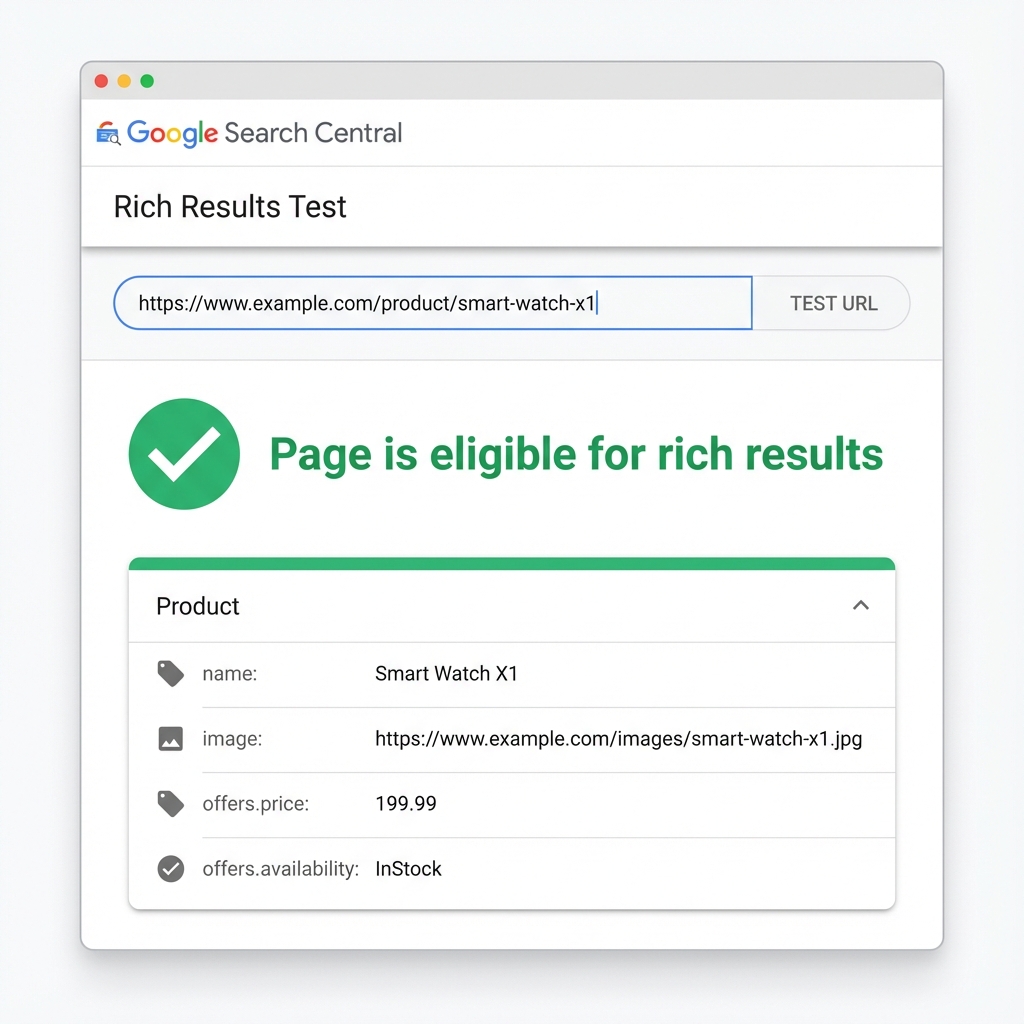
Step 1: Run the Rich Results Test
Google provides a free tool specifically for checking rich result eligibility.
Go to Rich Results Test and enter any product page URL from your store.
The tool shows:
- Whether your page has valid product schema
- Which properties Google detected
- Any errors preventing rich result eligibility
- Warnings about recommended properties you’re missing
A green checkmark indicates your page can display rich snippets. Yellow warnings suggest improvements but don’t prevent eligibility.
Step 2: Check multiple products
Don’t stop at one page.
Test at least five different products across various categories. This catches issues that might only affect specific product types or templates.
Pay attention to:
- Products with and without reviews
- Products with variants
- Out-of-stock items
- Products at different price points
Step 3: Validate against Schema.org standards
The Schema Markup Validator provides more detailed validation than Google’s tool.
It checks your markup against the complete Schema.org specification, catching subtle issues that might cause problems later.
Step 4: Monitor Search Console
After Google crawls your updated pages, check Search Console’s Shopping tab.
This dashboard shows:
- How many of your pages have valid product schema
- Common errors across your site
- Coverage trends over time
Set up email alerts for new schema issues so you catch problems quickly.
🔥 Pro tip: Bookmark these testing tools. You’ll use them regularly as you add products and update your store.
How long until rich snippets appear?
Adding product schema doesn’t create instant results. Understanding the timeline helps set realistic expectations.
The typical wait
Expect 2-12 weeks between implementing schema and seeing rich snippets in search results.
This timeline depends on Google’s crawl schedule. The search engine needs to:
- Discover your updated pages
- Crawl and parse the new structured data
- Process the schema through their systems
- Decide whether to display rich snippets
Each step takes time. Larger sites with established authority typically see faster results because Google crawls them more frequently.
Factors that speed things up
Site authority: Google crawls trusted sites more often. Established stores see schema appear faster than new ones.
Crawl frequency: If Google already visits your site daily, new schema gets processed quickly. Monthly crawls mean longer waits.
Schema completeness: Complete, error-free markup gets prioritized. Partial or problematic schema may face delays.
Page importance: High-traffic product pages often get crawled before lower-traffic ones.
What you can do to help
- Submit your sitemap through Search Console after implementing schema
- Request indexing for important product pages individually
- Ensure your pages load quickly (slow pages get crawled less)
- Keep your schema data accurate and up-to-date
The important caveat
Google doesn’t guarantee rich snippets for any page.
Even with perfect schema, Google decides whether to display enhanced results based on many factors. Your pages might consistently qualify but only show rich snippets for certain searches or at certain times.
Focus on what you can control: accurate, complete schema that gives Google every reason to show your products attractively.
Common product schema mistakes to avoid
These errors prevent rich snippets more often than you’d expect.
Duplicate schema blocks
Some Shopify themes include partial product schema by default.
If you add schema through an app or custom code without checking what already exists, you create duplicates. Google sees conflicting information and may ignore both blocks.
The fix: Audit existing schema before adding new markup. Remove duplicates or use a tool that handles conflicts automatically.
Price mismatches between schema and page
Your schema says $45. Your product page displays $49.
Google notices. This inconsistency violates their structured data guidelines and can disqualify you from rich results entirely. In severe cases, it might trigger manual penalties.
The fix: Ensure schema always reflects the current, visible price. Dynamic pricing makes this challenging without automation.
Missing review integration
You have 500 product reviews. Your schema shows zero.
Product schema without review data can still get rich snippets for price and availability. But you miss the star ratings that attract the most attention.
The fix: Connect your review app (Judge.me, Loox, Stamped, Yotpo, etc.) to your schema markup. Aggregate ratings should flow automatically.
Static schema that never updates
You added schema once. Six months later, prices changed, new products launched, and inventory shifted.
Your schema still shows the old data.
The fix: Use automated solutions that update schema when products change. Manual implementations require regular audits.
Ignoring validation errors
The Rich Results Test shows warnings. You figure they’re probably fine.
They’re often not fine. Even “warnings” (as opposed to “errors”) can prevent rich result eligibility in some cases.
The fix: Address all errors immediately. Investigate warnings and fix where feasible.
Product schema best practices
Follow these principles for reliable, long-term results.
Match schema data to visible page content
Every piece of information in your schema should correspond to something visitors can see on the page.
If your schema claims 4.8 stars, that rating should appear on the product page. If your schema shows “In Stock,” the page should reflect availability.
This isn’t just best practice. Google’s guidelines explicitly require it.
Include multiple product images
The image property accepts an array of URLs. Provide several high-quality product photos rather than just one.
Multiple images give Google more options for visual search features and shopping presentations.
Keep availability status accurate
Use the correct Schema.org availability values:
| Status | Schema Value |
|---|---|
| Available | https://schema.org/InStock |
| Sold out | https://schema.org/OutOfStock |
| Available for preorder | https://schema.org/PreOrder |
| Available for backorder | https://schema.org/BackOrder |
| Limited stock | https://schema.org/LimitedAvailability |
Wrong availability values confuse users and violate Google’s accuracy requirements.
Test after every significant change
New theme? Test your schema. Updated review app? Test your schema. Changed price format? Test your schema.
Assume nothing survives store changes intact.
Stay current with Google’s requirements
Schema.org evolves. Google’s support for various properties changes.
What qualified for rich snippets last year might require additional properties this year. Subscribe to Google Search Central updates to stay informed.
Frequently asked questions
What is product schema?
Product schema is structured data that tells search engines about your products. It’s code (usually JSON-LD format) that explicitly labels information like product name, price, availability, and reviews so search engines can display rich snippets in results.
Does Shopify include product schema automatically?
Shopify themes include basic product schema, but it’s typically incomplete. Most themes miss aggregate ratings, brand information, shipping details, and other properties needed for full rich snippet eligibility.
Is product schema required for SEO?
Product schema isn’t a ranking factor. You can rank without it. However, schema enables rich snippets that can increase click-through rates by up to 30%. The indirect SEO benefits from higher engagement often justify the implementation effort.
How do I know if my product schema is working?
Use Google’s Rich Results Test. Enter any product URL and the tool shows whether your schema is valid, what properties were detected, and any errors preventing rich result eligibility.
Why aren’t my rich snippets showing in Google?
Several possibilities:
- Schema has validation errors
- Google hasn’t recrawled your pages yet (wait 2-12 weeks)
- Schema data doesn’t match visible page content
- Your site lacks sufficient authority
- Google chose not to display rich snippets (their discretion)
Check for technical errors first, then give Google time to process changes.
Can product schema hurt my SEO?
Incorrect or misleading schema can cause problems. If your schema claims a price or availability that doesn’t match your page, Google may take manual action. Accurate schema carries no ranking penalty risk.
Moving forward with product schema
Product schema transforms how your products appear in search results.
The stores already showing star ratings, prices, and availability badges have an advantage. Every search, they stand out while competitors display plain listings.
Now you understand exactly what product schema does, what properties matter, and how to implement it correctly.
The path forward is straightforward:
- Audit your current schema – Use Rich Results Test to see what exists
- Identify gaps – Compare your properties against the recommended list
- Choose your implementation method – Manual, developer, or app
- Validate after implementation – Test multiple products
- Monitor ongoing – Check Search Console regularly
If you want the fastest path to complete product schema, Super Schema Plus handles implementation automatically. The app adds validated JSON-LD markup to every product, updates when products change, and maintains compatibility with Google’s evolving requirements.
No code. No ongoing maintenance. Just structured data that works.
Your products deserve to stand out in search results. Product schema makes that possible.